In this NordVPN review, we cover NordVPN’s apps, speed, pricing, free trial options, and customer support — with a focus on using NordVPN in China. This updated review is based on our real-world VPN testing in China and aims to answer one key question: does NordVPN work well in China in 2026?
阅读中文版:NordVPN中国评测: NordVPN怎么样?
Pros:
- Fast speed, reliable connections.
- Website has Chinese version.
- 30-day money-back guarantee.
- Desktop software offers obfuscation option to bypass China’s VPN blocking
Cons:
- The price (especially the monthly plan) is a little bit high.
Starting Price: $3.49/mo (via this discount link)
Free Trial: 3-day Google Play trial for eligible new Android users
Money-back Guarantee: 30-day money-back guarantee for eligible first-time purchases
Simultaneous Connections: 10 devices
NordVPN’s Website:
» Visit NordVPN (with discount)
About NordVPN

NordVPN is a popular VPN service launched in 2012 and based in Panama, where the company says there is no mandatory data-retention law. It is part of Nord Security, the company behind NordPass, NordLocker, NordLayer, and other digital-security services. Notable NordVPN features include NordLynx, its WireGuard-based protocol; Double VPN; Onion Over VPN; Dark Web Monitor; and scam and phishing protection.
NordVPN for China
Does NordVPN work in China?
Using a VPN in China can be unpredictable because restrictive networks may block VPN traffic and related websites. In practice, what works can change over time.
NordVPN offers tools designed for restrictive environments, including Obfuscated servers and the NordWhisper protocol, which can help VPN traffic blend in on heavily filtered networks. For the most reliable setup, NordVPN’s desktop apps (Windows/macOS) typically offer the most complete feature set, while mobile apps can be convenient for day-to-day use.
Based on our recent China testing, NordVPN can work in China, especially when you use the Windows/macOS apps with Obfuscated servers (and NordWhisper when available). Reliability can still vary by city, ISP, and network type, but overall NordVPN performed well enough in our tests that we include it in our list of best VPNs for China.
Because access methods and server availability can change, it’s best to check NordVPN’s official support resources (or live chat) for the latest working connection options before you travel or when you encounter blocks.
Tips for Using NordVPN in China
Using NordVPN in China can be hit-or-miss depending on the network (hotel Wi-Fi, office Wi-Fi, campus networks, and some mobile networks can behave very differently). If NordVPN suddenly won’t connect, these tips usually give you the fastest path back online:
1) Set everything up before you arrive
- Download the NordVPN apps, log in, and test connections before entering China.
- Save a copy of your NordVPN service credentials and keep them somewhere accessible (password manager/offline note).
- If possible, download a few manual configuration files in advance so you’re not stuck searching for them later.
2) Switch to the “China-friendly” connection modes first
- If available, try NordWhisper when normal VPN connections are blocked.
- Enable Obfuscated servers (often the most reliable “quick fix” on restrictive networks).
- If you’re using OpenVPN, try both UDP and TCP (TCP can be slower, but sometimes connects when UDP fails).
3) Try nearby locations for better stability
Pick servers closer to China for lower latency and better stability (for example Hong Kong, Japan, Singapore, or US West Coast if nearby options are unstable).
4) Use manual setup when the app won’t connect
If the NordVPN app/desktop client gets stuck on “Connecting,” try a manual VPN setup (OpenVPN or IKEv2, depending on your device). In our China testing, manual setup can still work even when the app is blocked—just expect a few extra steps.
5) Change networks when troubleshooting
- If hotel Wi-Fi blocks VPN traffic, try a different Wi-Fi network (or your phone hotspot).
- If mobile data is unreliable, try Wi-Fi again. Results can vary a lot by network and location.
6) Keep the app updated, but don’t rely on last-minute downloads
VPN updates can improve connectivity in restrictive environments, but downloading anything can be inconvenient once you’re inside China. Update when you can, and keep installers/config files handy.
7) Contact NordVPN live chat as soon as it breaks
If NordVPN stops working, use NordVPN’s 24/7 live chat to get the latest working settings (protocol, obfuscation, server suggestions, and any current troubleshooting steps). In China, the “best settings” can change quickly, so official support is often the fastest solution.
» Visit NordVPN (with discount)
NordVPN’s Features
NordVPN’s Server Locations:
NordVPN’s Trust Center currently lists more than 8,700 servers covering 224 locations. Its live server table contains 148 country entries, including locations that are best for China: Hong Kong, Japan, US West Coast etc. NordVPN is also one of the best VPNs for Taiwan, Hong Kong and Japan etc.
NordVPN’s Supported VPN Protocols:
NordVPN supports modern VPN protocols including OpenVPN (TCP/UDP), IKEv2/IPsec, and NordLynx (NordVPN’s WireGuard-based protocol). For restrictive networks, NordVPN also offers NordWhisper, designed to help VPN traffic work more reliably on networks that actively block VPN connections.
NordLynx is typically the best choice for speed and everyday use, while OpenVPN can be useful for compatibility and troubleshooting. For China and other high-censorship environments, using Obfuscated servers (and NordWhisper when available) can significantly improve the chances of connecting on heavily filtered networks.
NordVPN’s VPN Restrictions
NordVPN does not impose data caps: you get unlimited bandwidth, no speed limits, and you can switch servers as often as you want.
For simultaneous connections (multi-logins), NordVPN currently allows up to 10 devices at the same time on one account. If you need to cover more devices, setting up NordVPN on a compatible router can protect your whole home network while typically counting as just one connection.
NordVPN supports P2P and torrenting. In current versions of the NordVPN apps, the separate P2P server category has been removed because all standard NordVPN servers now support P2P traffic. NordVPN does not currently support port forwarding, which may matter for certain torrenting workflows and self-hosted services.
NordVPN’s Supported Devices:
NordVPN provides native apps for Windows, macOS, Linux, Android, iOS, Android TV, Apple TV/tvOS, and Amazon Fire devices. It also provides browser proxy extensions for Chrome, Firefox, and Edge. Chromebooks, gaming consoles, unsupported smart TVs, and other devices without a dedicated app can use router or platform-specific setup options.
For devices without a native VPN app, NordVPN can be configured through a compatible router or, where supported, SmartDNS. SmartDNS can help with content access but does not encrypt traffic. SmartPlay is built into NordVPN’s apps and combines SmartDNS functionality with an encrypted VPN connection.
NordVPN for Streaming:
NordVPN is a strong choice for streaming thanks to SmartPlay (its built-in Smart DNS technology), which helps unblock geo-restricted platforms more reliably. In our experience, it works well with major services like Netflix (multiple regional libraries), Hulu, Disney+, Amazon Prime Video, BBC iPlayer, and Max (HBO Max), and it’s fast enough for HD and 4K streaming on nearby servers.
That said, streaming access can change at any time as platforms update their VPN detection—so results may vary by region and server. It’s still one of the best VPNs for Netflix.
NordVPN’ Privacy Policy:
NordVPN says it follows a strict no-logs policy and operates under Panama’s jurisdiction. Its no-logs claims have undergone six independent assurance engagements. The sixth was conducted by Deloitte Lithuania between November 10 and December 12, 2025 under ISAE 3000 (Revised). The point-in-time assessment report was issued on December 12, 2025 and announced in February 2026.
For connection protection, NordVPN provides an automatic Kill Switch on Windows, macOS, Android, iOS, and Linux. Its native apps also use NordVPN’s private DNS servers while connected to help prevent DNS leaks.
NordVPN’ Other Features:
Beyond its VPN connection, NordVPN offers two related protection features. “Scam and phishing protection,” previously called Threat Protection, uses DNS filtering to block unsafe domains, ads, and trackers while connected on supported platforms. “Scam, phishing, and malware protection,” previously called Threat Protection Pro, adds malicious-URL blocking, download scanning, quarantine, app-vulnerability checks on Windows, and broader ad and tracker blocking without requiring an active VPN connection. The full feature is available on supported Windows devices and the sideloaded macOS app; availability also depends on the subscription plan.
NordVPN additionally offers Double VPN, Onion Over VPN, Dark Web Monitor, Meshnet, browser proxy extensions, SmartPlay, and an optional Dedicated IP add-on. Features and platform availability vary, so they should not be presented as included identically in every app or plan.
Additional Nord Security Services (Beyond the VPN)
Plan names and bundles vary by market and can change. Currently the Complete and Prime plans included a password manager and 1 TB of encrypted cloud storage. Prime also included Coveron identity protection, subject to eligibility and additional terms. Dedicated IP and Incogni were optional checkout add-ons, while NordLayer remained a separate business product. Availability varies by market, so the local NordVPN checkout is the most reliable source for current plan inclusions.
NordPass (password manager)
NordPass is Nord Security’s password manager for storing and autofilling logins across devices. It’s useful if you’re trying to reduce password reuse and keep credentials in one protected vault.
NordLocker (encrypted cloud storage)
NordLocker is an encrypted file vault with cloud storage options. It’s designed for protecting sensitive documents (IDs, contracts, travel files, etc.) and syncing them securely across devices.
Incogni (personal data removal)
Incogni is a data-broker removal service that sends opt-out/removal requests on your behalf. It’s aimed at reducing how widely your personal information is collected, sold, and resurfaced on people-search and broker sites.
Saily (eSIM mobile data for travel)
Saily is Nord Security’s travel eSIM service. It’s handy if you want a data-only plan abroad without swapping physical SIM cards — especially useful when you want reliable mobile internet for maps, messaging, and verification codes.
Note: What’s included depends on your plan and region. In general, NordVPN’s higher tiers are more likely to bundle Nord Security tools (for example, plans that add NordPass, NordLocker storage, and/or Incogni), while the base plan focuses on the VPN itself.
» Visit NordVPN (with discount)
NordVPN’s Price & Free Trial
NordVPN has tiered plans (Basic / Plus / Complete / Prime) with different bundles and pricing. Currently NordVPN lists the following prices (with discount via this link):
- Basic: $14.99 billed monthly. The one-year offer was $5.49/month, billed as $65.88 for the first 12 months and renewing at $139.08/year. The two-year offer was $3.49/month, billed as $94.23 for the first 27 months, including three extra months, and renewing at $139.08/year.
- Complete: $19.99 billed monthly. The one-year offer was $6.49/month, billed as $77.88 for the first 12 months and renewing at $219.48/year. The two-year offer was $4.49/month, billed as $121.23 for the first 27 months, including three extra months, and renewing at $219.48/year.
- Prime: $29.99 billed monthly. The one-year offer was $9.49/month, billed as $113.88 for the first 12 months and renewing at $296.28/year. The two-year offer was $7.49/month, billed as $202.23 for the first 27 months, including three extra months, and renewing at $296.28/year.
Free trial: Eligible first-time Android users can receive a 3-day trial through Google Play. NordVPN says this trial is not available to users in India or South Korea.
Money-back guarantee: New subscription purchases are covered by a separate 30-day money-back guarantee. It applies to the initial purchase rather than renewals, and purchases made through Apple, Amazon, retailers, or other third parties may follow that seller’s refund process.
Payment methods
NordVPN accepts credit and prepaid debit cards, cryptocurrency, PayPal, Sofort/Klarna, bank or local bank transfers, Apple Pay, Google Pay, Amazon Appstore payments, Apple App Store payments, and Google Play payments. Cash purchases are also available through supported retail stores. Available methods vary by region and checkout channel. Cryptocurrency and supported retail cash purchases can provide more payment privacy.
» Visit NordVPN (with discount)
NordVPN Apps & Device Support
Supported platforms
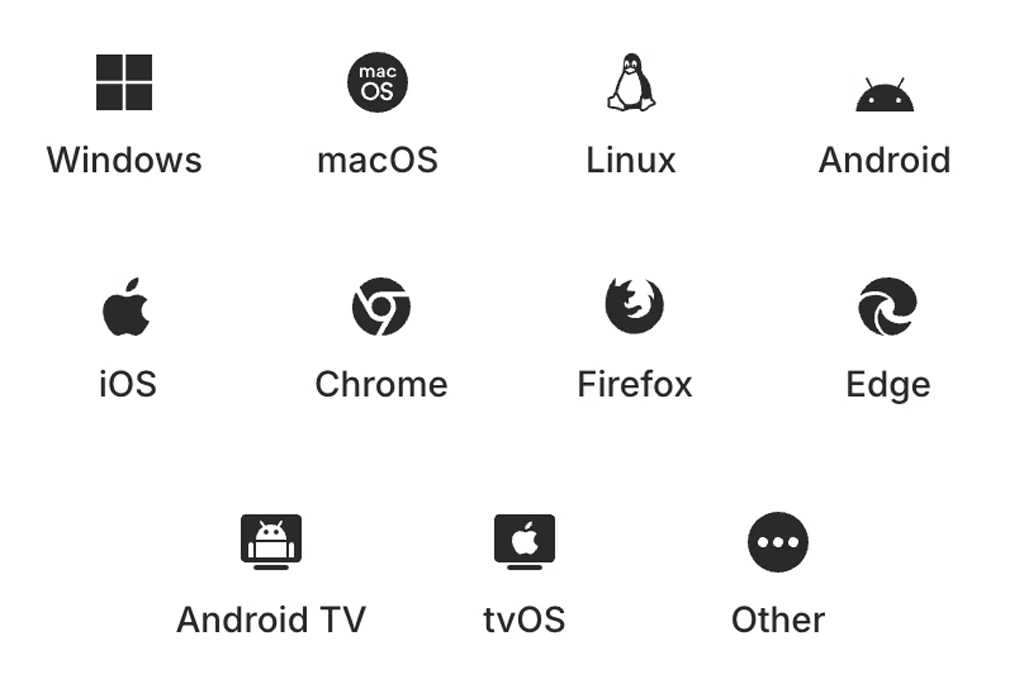
NordVPN lists native apps for Windows, macOS, Linux, Android, iOS, Android TV, Apple TV/tvOS, and Amazon Fire devices. It also provides browser proxy extensions for Chrome, Firefox, and Edge. Chromebooks, gaming consoles, unsupported smart TVs, and other devices without a dedicated app can use router or platform-specific setup options.
Windows & macOS apps (best overall feature set)
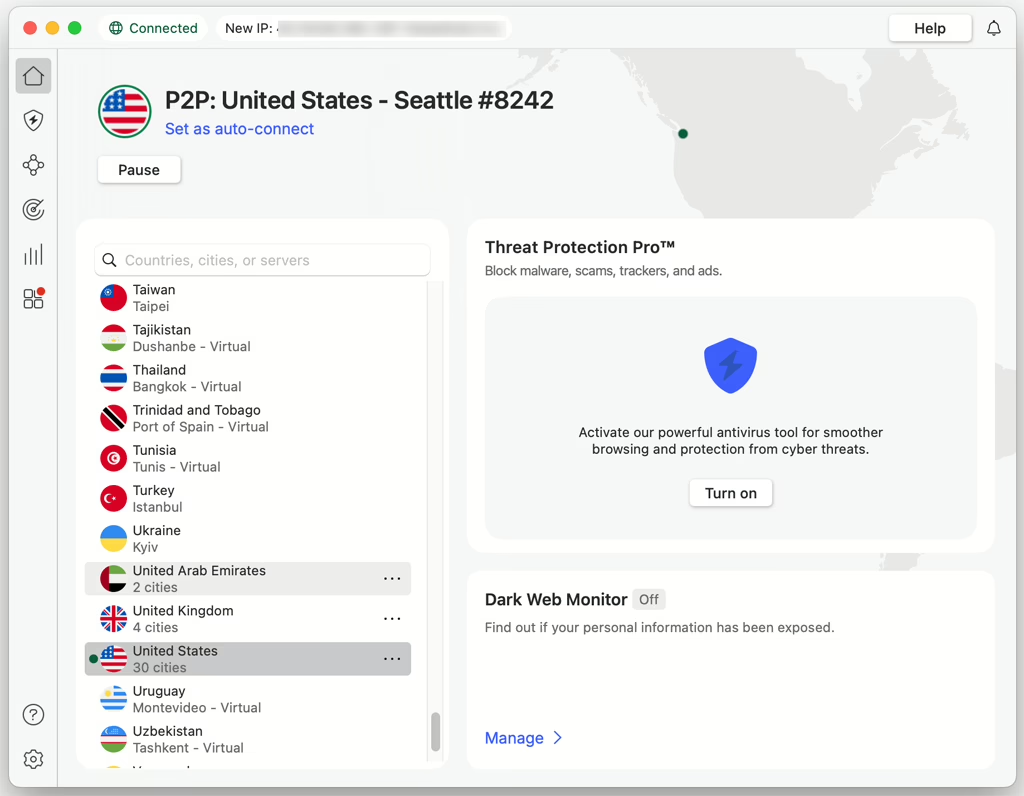
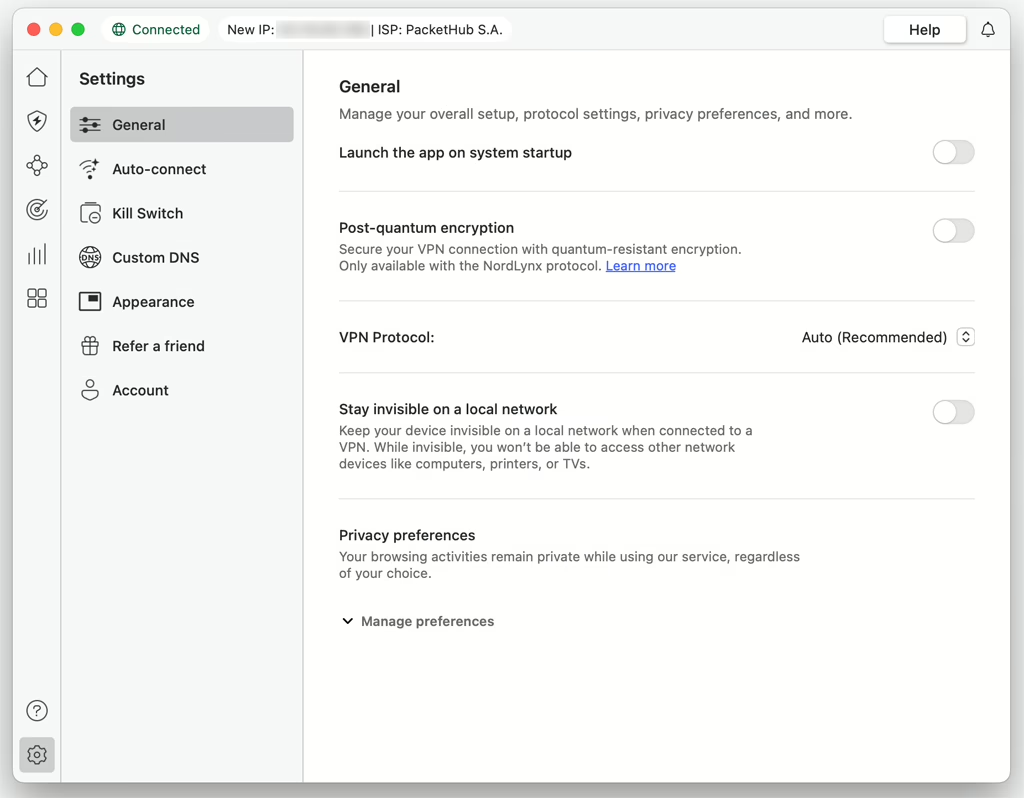
NordVPN provides native Windows and macOS apps, but their protocols and features are not identical. The Windows 10 64-bit and Windows 11 app offers NordLynx, NordWhisper, and OpenVPN selection, along with an Internet Kill Switch, specialty servers, auto-connect, and split tunneling.
The current macOS app requires macOS 14 or later, although an older build remains available for macOS 12 and 13. The website-download version includes NordLynx, custom DNS, an app-level Kill Switch, and plan-dependent malware and browsing protection. NordVPN also publishes manual OpenVPN and IKEv2 configuration options. Its current split-tunneling documentation does not list macOS as a supported platform.
Linux support (GUI app)
NordVPN now offers an open-source Linux GUI while retaining command-line control. Its current download page lists Ubuntu 22.04 or later, Debian 12 or later, Fedora 43 or later, Linux Mint 21 or later, and Raspberry Pi OS. The Linux page also highlights post-quantum encryption and scam and phishing protection.
iOS app
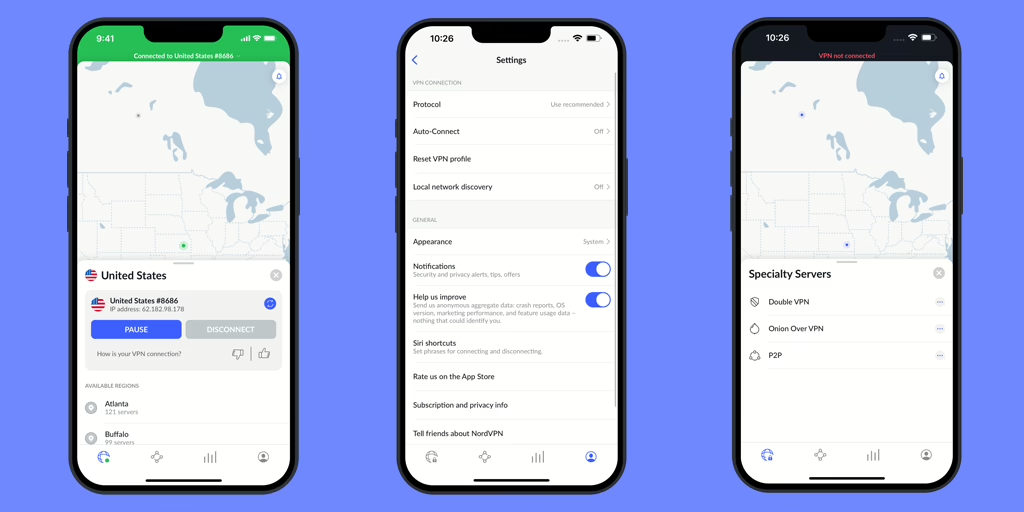
The native iOS app supports NordLynx and includes a Kill Switch, Meshnet, Onion Over VPN, Dark Web Monitor, and scam and phishing protection. NordVPN also publishes manual OpenVPN and IKEv2 configuration options for iOS. Split tunneling is not currently available on iOS.
Android app (most complete mobile feature set)
NordVPN’s native app supports Android 9 or later and is available through Google Play or as a direct APK. The Android app includes NordLynx and OpenVPN, split tunneling, a Kill Switch, and scam and phishing protection. The Google Play version offers a 3-day trial for eligible first-time users, while the direct APK can provide broader ad blocking than the Play Store version.
Browser extensions
NordVPN provides extensions for Chrome, Firefox, and Edge. These work as encrypted proxy extensions (browser traffic only), so they’re best for quick browsing rather than full-device protection.
Router, Smart TV, and console support
If you want to protect multiple devices at once, you can set up NordVPN on compatible routers (including select ASUS, Linksys, and Netgear models, plus many DD-WRT/Tomato routers). This is also the best approach for devices that can’t run VPN apps.
For streaming on smart TVs that don’t support VPN apps (for example some Samsung/LG models), NordVPN’s SmartPlay/Smart DNS is the usual workaround. Game consoles like PlayStation, Xbox, and Nintendo Switch don’t have native NordVPN apps, but they can use the VPN via router setup or Smart DNS.
Interface languages
NordVPN apps support many languages, including English, Chinese, Japanese, Korean, and most major European languages.
» Visit NordVPN (with discount)
NordVPN’s Customer Support
NordVPN offers 24/7 support through live chat and email. Live chat starts with an automated assistant and transfers you to a human agent if additional help is needed.
Email requests can be submitted through the Help Center, with replies typically arriving within 24 hours. NordVPN does not offer phone support.
The searchable Help Center covers installation, connection problems, billing, accounts, protocols, privacy, and individual NordVPN features. It is available in several languages and includes setup instructions for major devices and operating systems.
NordVPN FAQ (China & General)
Does NordVPN work in China?
Based on our recent China testing, NordVPN can work in China, especially on Windows/macOS using Obfuscated servers (and NordWhisper when available). Reliability can still vary by city, ISP, and network type, so it’s smart to have fallback options (manual setup + support).
What are the best NordVPN settings for China?
Start with NordWhisper (if available) or enable Obfuscated servers. If you’re using OpenVPN, try UDP first, then switch to TCP if UDP won’t connect. Also try switching to nearby locations (e.g., Hong Kong, Japan, Singapore) for better stability and latency.
What should I do if NordVPN stops working in China?
Try a different protocol (NordWhisper/Obfuscated/OpenVPN TCP), switch server locations, and test on another network (Wi-Fi vs hotspot). If the app still won’t connect, use manual VPN setup (OpenVPN or IKEv2, depending on device) and contact NordVPN 24/7 live chat for the latest working suggestions.
Can I use NordVPN in China without installing the app?
Yes. If the app/desktop client is blocked or unstable, you can often still connect by setting up NordVPN manually (for example, via OpenVPN or IKEv2). It takes more steps, but it’s a useful backup method.
How many devices can I use with NordVPN at the same time?
NordVPN allows up to 10 simultaneous connections on one account. For more coverage, installing NordVPN on a compatible router can protect multiple devices at once.
Which devices support NordVPN?
NordVPN provides native apps for Windows, macOS, Linux, Android, iOS, Android TV, Apple TV/tvOS, and Amazon Fire devices, plus proxy extensions for Chrome, Firefox, and Edge. Chromebooks, consoles, unsupported smart TVs, and other devices can use router or platform-specific setup options.
Can I use NordVPN in China to access AI tools like ChatGPT and Gemini?
Yes, if NordVPN is connected successfully in China, it can usually help you access AI services like ChatGPT and Gemini. One important caveat: these services don’t operate in every country/region, so avoid connecting to VPN server locations where ChatGPT/Gemini aren’t officially available. If you run into access errors, try switching to a different server location (and use Obfuscated servers or NordWhisper when needed).
Does NordVPN have a free trial?
NordVPN offers a 3-day Google Play trial for eligible first-time Android users. The trial does not apply to users in India or South Korea. This is separate from NordVPN’s 30-day money-back guarantee for eligible initial subscription purchases.
Is NordVPN good for streaming?
NordVPN is a solid streaming VPN thanks to SmartPlay (Smart DNS) and a large server network. It often works with major platforms (Netflix regional libraries, Disney+, Prime Video, BBC iPlayer, etc.), but streaming access can change over time as services update VPN detection.
Does NordVPN support torrenting?
Yes. NordVPN supports P2P/torrenting. Bandwidth is unlimited.
Does NordVPN support port forwarding?
No. NordVPN does not offer port forwarding, which may matter for certain torrenting workflows and self-hosted services.
What is “Dedicated IP” on NordVPN, and do I need it?
Dedicated IP is an optional paid add-on that gives you a fixed IP assigned only to you in select locations. It can help reduce CAPTCHAs and IP blocks for certain sites, but most users don’t need it for normal browsing or streaming.
How do I contact NordVPN support, and is it 24/7?
NordVPN offers 24/7 live chat and email support. There’s no phone support. The Help Center includes setup guides, troubleshooting, and billing articles.
Is NordVPN available in Chinese or other languages?
NordVPN apps support many interface languages (including Chinese and Japanese). Live chat is mainly in English, and the Support Center is available in multiple languages such as Japanese, Korean, German, French, Spanish, Traditional Chinese, and more.
Is using a VPN in China legal?
Rules and enforcement can vary. If you’re traveling or living in China, it’s best to understand local regulations and use VPNs responsibly.
NordVPN Review Conclusion
NordVPN is a well-known VPN with a large global user base and a strong set of privacy and security features. Most importantly for this review: based on our recent China testing, NordVPN can work in China, especially when you use its desktop apps (Windows/macOS) with Obfuscated servers (and NordWhisper when available). Connection reliability can vary by network and location, but overall NordVPN is a solid option if you want a fast, stable VPN for China—plus you can fall back to manual setup and 24/7 live chat support if the app stops connecting.
» Visit NordVPN (with discount)
If you are looking for a reliable VPN services to be used in China, Please make sure to read our list of Best VPNs for China.