In this NordVPN review, we cover NordVPN’s apps, speed, pricing, free trial options, and customer support — with a focus on using NordVPN in China. This updated review is based on our real-world VPN testing in China and aims to answer one key question: does NordVPN work well in China in 2026?
阅读中文版:NordVPN中国评测: NordVPN怎么样?
Pros:
- Fast speed, reliable connections.
- Website has Chinese version.
- 30-day money-back guarantee.
- Desktop software offers obfuscation option to bypass China’s VPN blocking
Cons:
- The price (especially the monthly plan) is a little bit high.
Starting Price: $2.99/mo (via this discount link)
Free Trial: 30-day money-back
Simultaneous Connections: 10 devices
NordVPN’s Website:
» Visit NordVPN (with discount)
About NordVPN

NordVPN is a leading VPN service founded in 2012 and registered in Panama, a privacy-friendly jurisdiction with no mandatory data retention laws. It’s part of Nord Security (the company behind services like NordPass, NordLocker, NordLayer, and more). NordVPN’s standout features include NordLynx (built on WireGuard), multi-hop protection via Double VPN, Onion Over VPN, and a growing set of security tools such as Threat Protection and Dark Web Monitor.
NordVPN for China
Does NordVPN work in China?
Using a VPN in China can be unpredictable because restrictive networks may block VPN traffic and related websites. In practice, what works can change over time.
NordVPN offers tools designed for restrictive environments, including Obfuscated servers and the NordWhisper protocol, which can help VPN traffic blend in on heavily filtered networks. For the most reliable setup, NordVPN’s desktop apps (Windows/macOS) typically offer the most complete feature set, while mobile apps can be convenient for day-to-day use.
Based on our recent China testing, NordVPN can work in China, especially when you use the Windows/macOS apps with Obfuscated servers (and NordWhisper when available). Reliability can still vary by city, ISP, and network type, but overall NordVPN performed well enough in our tests that we include it in our list of best VPNs for China.
Because access methods and server availability can change, it’s best to check NordVPN’s official support resources (or live chat) for the latest working connection options before you travel or when you encounter blocks.
Tips for Using NordVPN in China
Using NordVPN in China can be hit-or-miss depending on the network (hotel Wi-Fi, office Wi-Fi, campus networks, and some mobile networks can behave very differently). If NordVPN suddenly won’t connect, these tips usually give you the fastest path back online:
1) Set everything up before you arrive
- Download the NordVPN apps, log in, and test connections before entering China.
- Save a copy of your NordVPN service credentials and keep them somewhere accessible (password manager/offline note).
- If possible, download a few manual configuration files in advance so you’re not stuck searching for them later.
2) Switch to the “China-friendly” connection modes first
- If available, try NordWhisper when normal VPN connections are blocked.
- Enable Obfuscated servers (often the most reliable “quick fix” on restrictive networks).
- If you’re using OpenVPN, try both UDP and TCP (TCP can be slower, but sometimes connects when UDP fails).
3) Try nearby locations for better stability
Pick servers closer to China for lower latency and better stability (for example Hong Kong, Japan, Singapore, or US West Coast if nearby options are unstable).
4) Use manual setup when the app won’t connect
If the NordVPN app/desktop client gets stuck on “Connecting,” try a manual VPN setup (OpenVPN or IKEv2, depending on your device). In our China testing, manual setup can still work even when the app is blocked—just expect a few extra steps.
5) Change networks when troubleshooting
- If hotel Wi-Fi blocks VPN traffic, try a different Wi-Fi network (or your phone hotspot).
- If mobile data is unreliable, try Wi-Fi again. Results can vary a lot by network and location.
6) Keep the app updated, but don’t rely on last-minute downloads
VPN updates can improve connectivity in restrictive environments, but downloading anything can be inconvenient once you’re inside China. Update when you can, and keep installers/config files handy.
7) Contact NordVPN live chat as soon as it breaks
If NordVPN stops working, use NordVPN’s 24/7 live chat to get the latest working settings (protocol, obfuscation, server suggestions, and any current troubleshooting steps). In China, the “best settings” can change quickly, so official support is often the fastest solution.
» Visit NordVPN (with discount)
NordVPN’s Features
NordVPN’s Server Locations:
NordVPN has more than 8000 VPN servers in more than 170 countries/locations, including locations that are best for China: Hong Kong, Japan, US West Coast etc. NordVPN is also one of the best VPNs for Taiwan, Hong Kong and Japan etc.
NordVPN’s Supported VPN Protocols:
NordVPN supports modern VPN protocols including OpenVPN (TCP/UDP), IKEv2/IPsec, and NordLynx (NordVPN’s WireGuard-based protocol). For restrictive networks, NordVPN also offers NordWhisper, designed to help VPN traffic work more reliably on networks that actively block VPN connections.
NordLynx is typically the best choice for speed and everyday use, while OpenVPN can be useful for compatibility and troubleshooting. For China and other high-censorship environments, using Obfuscated servers (and NordWhisper when available) can significantly improve the chances of connecting on heavily filtered networks.
NordVPN’s VPN Restrictions
NordVPN does not impose data caps: you get unlimited bandwidth, no speed limits, and you can switch servers as often as you want.
For simultaneous connections (multi-logins), NordVPN currently allows up to 10 devices at the same time on one account. If you need to cover more devices, setting up NordVPN on a compatible router can protect your whole home network while typically counting as just one connection.
P2P/torrenting is supported, and NordVPN provides P2P-optimized servers for better performance. One limitation to note: port forwarding isn’t supported on NordVPN.
NordVPN’s Supported Devices:
NordVPN offers apps for Windows, macOS, Linux (GUI app available), iOS, Android, Chromebook, and streaming devices like Amazon Fire TV, Android TV, and Apple TV. It also provides browser extensions (Chrome/Firefox/Edge).
For devices that can’t run VPN apps (some smart TVs and game consoles), you can use NordVPN via a compatible Wi-Fi router setup or NordVPN’s SmartPlay/Smart DNS features, which helps with streaming on supported platforms.
NordVPN for Streaming:
NordVPN is a strong choice for streaming thanks to SmartPlay (its built-in Smart DNS technology), which helps unblock geo-restricted platforms more reliably. In our experience, it works well with major services like Netflix (multiple regional libraries), Hulu, Disney+, Amazon Prime Video, BBC iPlayer, and Max (HBO Max), and it’s fast enough for HD and 4K streaming on nearby servers.
That said, streaming access can change at any time as platforms update their VPN detection—so results may vary by region and server. It’s still one of the best VPNs for Netflix.
NordVPN’ Privacy Policy:
NordVPN says it follows a strict no-logs policy, meaning it doesn’t store activity logs that could be used to trace what you do online. The service is registered in Panama, a privacy-friendly jurisdiction with no mandatory data-retention laws. NordVPN’s no-logs claims have also been independently audited multiple times, including a Deloitte audit completed in December 2024.
On the security side, NordVPN includes a kill switch, DNS leak protection, and IPv6 leak protection, which helps prevent accidental exposure if the VPN connection drops.
NordVPN’ Other Features:
Beyond basic VPN access, NordVPN includes several extra features that improve privacy, security, and day-to-day usability. Its Kill Switch can help prevent accidental IP leaks if the VPN disconnects, and Threat Protection (including the Pro version on supported platforms) can block malicious sites, trackers, and many ads while you browse. NordVPN also offers browser extensions for Chrome, Firefox, and Edge (useful for quick, browser-only protection), plus advanced privacy options like Double VPN and Onion Over VPN for users who want extra layers of routing. For convenience, you also get tools like Dark Web Monitor and Meshnet, and a Dedicated IP add-on is available for users who prefer a consistent IP and fewer CAPTCHA/denylist issues. For streaming, NordVPN’s SmartPlay helps access geo-restricted content on major platforms, though results can vary by service and region.
Additional Nord Security Services (Beyond the VPN)
NordVPN is part of the broader Nord Security ecosystem, and you’ll often see its higher-tier plans bundled with extra privacy/security tools. If you don’t want to subscribe to separate services, these add-ons can be a convenient way to cover more than just VPN access:
NordPass (password manager)
NordPass is Nord Security’s password manager for storing and autofilling logins across devices. It’s useful if you’re trying to reduce password reuse and keep credentials in one protected vault.
NordLocker (encrypted cloud storage)
NordLocker is an encrypted file vault with cloud storage options. It’s designed for protecting sensitive documents (IDs, contracts, travel files, etc.) and syncing them securely across devices.
Incogni (personal data removal)
Incogni is a data-broker removal service that sends opt-out/removal requests on your behalf. It’s aimed at reducing how widely your personal information is collected, sold, and resurfaced on people-search and broker sites.
Saily (eSIM mobile data for travel)
Saily is Nord Security’s travel eSIM service. It’s handy if you want a data-only plan abroad without swapping physical SIM cards — especially useful when you want reliable mobile internet for maps, messaging, and verification codes.
Note: What’s included depends on your plan and region. In general, NordVPN’s higher tiers are more likely to bundle Nord Security tools (for example, plans that add NordPass, NordLocker storage, and/or Incogni), while the base plan focuses on the VPN itself.
» Visit NordVPN (with discount)
NordVPN’s Price & Free Trial
NordVPN has tiered plans (Basic / Plus / Complete / Prime) with different bundles and pricing. Currently NordVPN lists the following prices (with discount via this link):
- Basic: $12.99 monthly · $68.85/year ($5.74/mo) · $83.43 for 2 years ($2.99/mo)
- Plus: $13.99 monthly · $82.35/year ($6.86/mo) · $107.73 for 2 years ($3.99/mo)
- Complete: $14.99 monthly · $97.35/year ($8.11/mo) · $132.03 for 2 years ($4.99/mo)
- Prime: $17.99 monthly · $127.35/year ($10.61/mo) · $175.23 for 2 years ($6.99/mo)
Free trial: No free trial on desktop. A 7-day free trial is available only for new users who sign up via the Android or iOS mobile apps.
Money-back guarantee: 30-day money-back guarantee.
Payment methods
NordVPN supports credit cards (Visa, Mastercard, American Express, Discover), PayPal, Google Pay, and App Store/iTunes billing for mobile subscriptions. Amazon Pay and other regional payment methods may be available in some areas.
NordVPN also supports cryptocurrency payments, but availability can vary by region and may not always appear at checkout. Some anonymous options (like gift cards in select regions) may also be available depending on where you purchase.
» Visit NordVPN (with discount)
NordVPN Apps & Device Support
Supported platforms
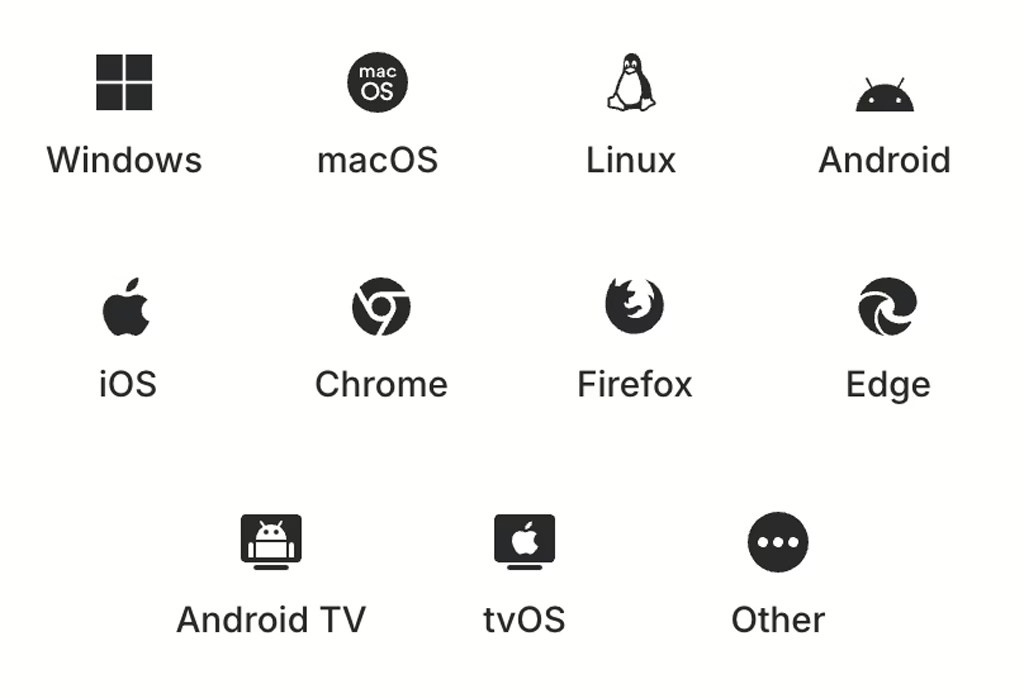
NordVPN has apps for Windows, macOS, Linux, iOS, Android, and Chromebook. It also offers native apps for Amazon Fire TV, Android TV, and Apple TV, plus browser extensions for Chrome, Firefox, and Edge.
Windows & macOS apps (best overall feature set)
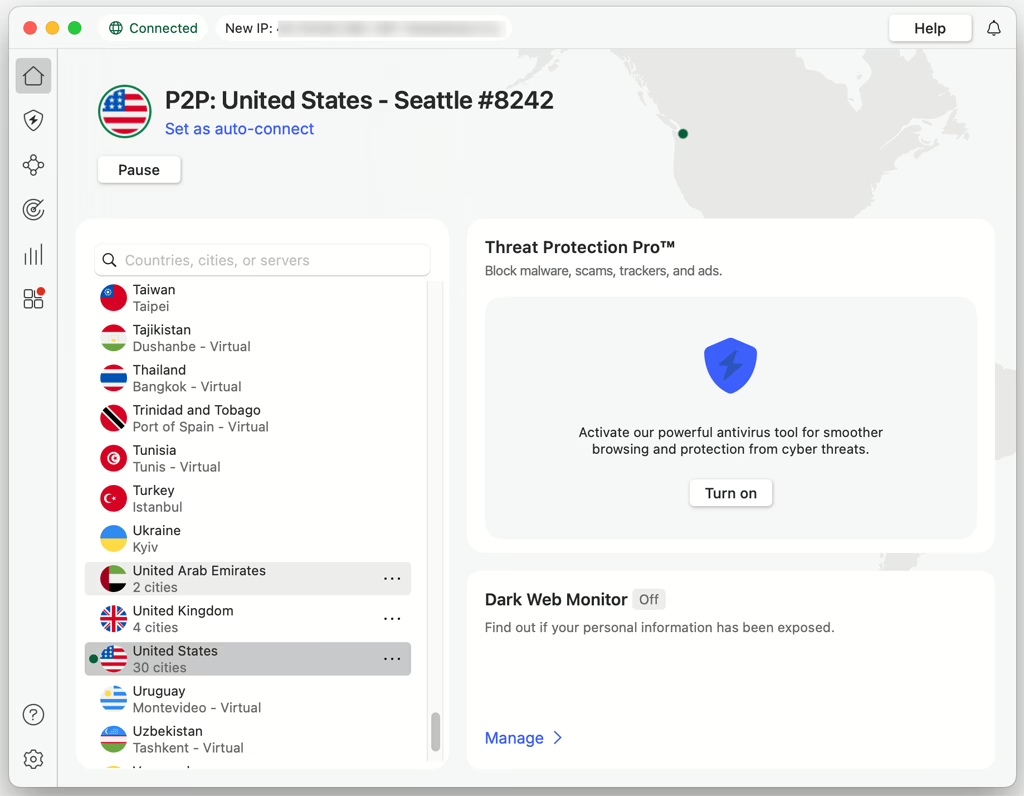
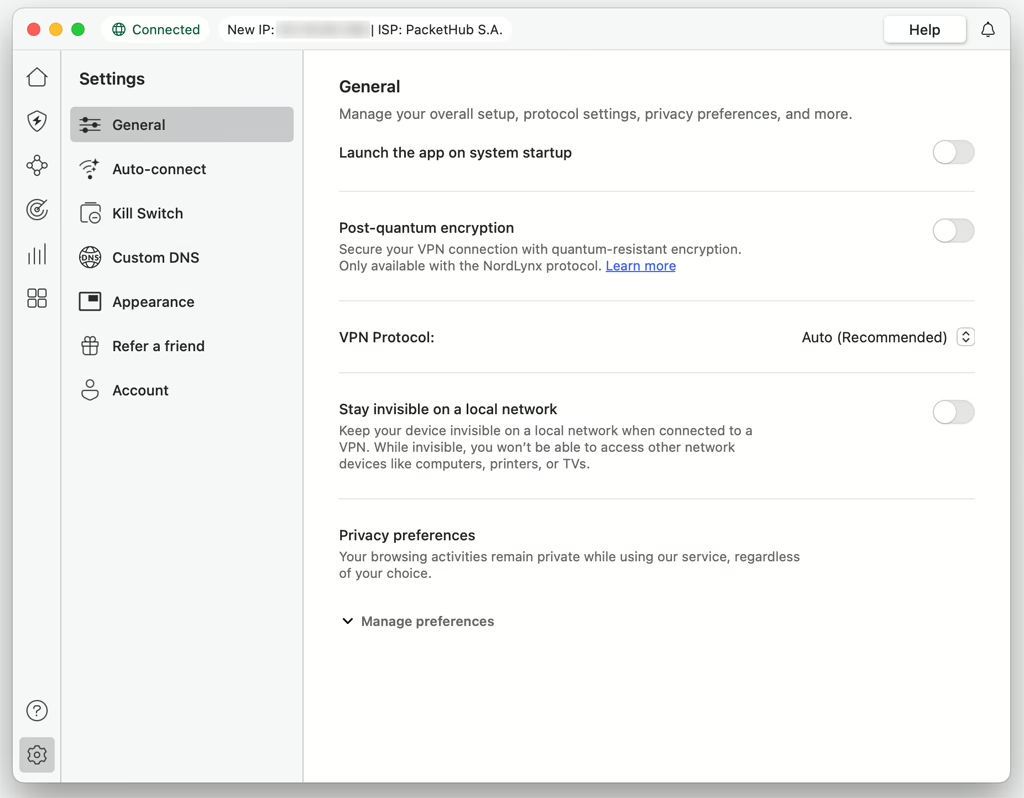
NordVPN’s Windows and macOS apps are the most full-featured. They support NordLynx, OpenVPN, and IKEv2, and include key tools such as Threat Protection, split tunneling, kill switch options, Dark Web Monitor, and Meshnet for private networking.
Linux support (GUI app)
NordVPN now offers a full Linux GUI app (previously CLI-only). It supports popular distros like Ubuntu, Debian, Fedora, and Arch, and includes essentials such as NordLynx, a kill switch, Threat Protection, and split tunneling.
iOS app
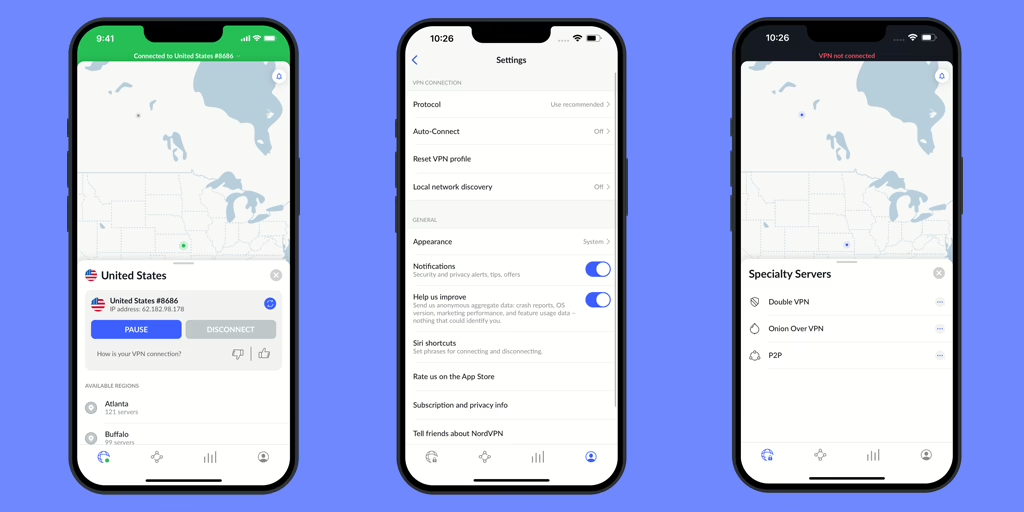
The iOS app supports NordLynx and IKEv2 and includes features like Threat Protection and Dark Web Monitor. Split tunneling isn’t available on iOS due to platform limitations.
Android app (most complete mobile feature set)
Android supports NordLynx/OpenVPN, split tunneling, a kill switch, and Threat Protection. NordVPN also supports Android TV, which makes it a convenient option for streaming devices.
Browser extensions
NordVPN provides extensions for Chrome, Firefox, and Edge. These work as encrypted proxy extensions (browser traffic only), so they’re best for quick browsing rather than full-device protection.
Router, Smart TV, and console support
If you want to protect multiple devices at once, you can set up NordVPN on compatible routers (including select ASUS, Linksys, and Netgear models, plus many DD-WRT/Tomato routers). This is also the best approach for devices that can’t run VPN apps.
For streaming on smart TVs that don’t support VPN apps (for example some Samsung/LG models), NordVPN’s SmartPlay/Smart DNS is the usual workaround. Game consoles like PlayStation, Xbox, and Nintendo Switch don’t have native NordVPN apps, but they can use the VPN via router setup or Smart DNS.
Interface languages
NordVPN apps support many languages, including English, Chinese, Japanese, Korean, and most major European languages.
» Visit NordVPN (with discount)
NordVPN’s Customer Support
NordVPN offers 24/7 customer support through live chat and email. On the website, you can usually start by typing your question into the help widget or support form—NordVPN will surface relevant Help Center articles first, and if you still need help you can connect to a live agent.
For email support, you can submit a request through NordVPN’s support contact form, and responses are typically handled within 24 hours. NordVPN does not offer phone support, since the company prefers resolving issues through chat/email where agents can share step-by-step instructions and visual guidance.
In terms of self-help resources, NordVPN maintains a large, searchable Help Center (support.nordvpn.com) that covers setup, troubleshooting, billing, and feature explanations. It also includes detailed setup guides for every major platform with screenshots, plus video tutorials for common scenarios. Live chat is mainly in English, while the Support Center is available in multiple languages including Japanese, Korean, German, French, Spanish, Italian, Dutch, Swedish, Traditional Chinese, Danish, Polish, Portuguese (Brazil), and Norwegian.
NordVPN FAQ (China & General)
Does NordVPN work in China?
Based on our recent China testing, NordVPN can work in China, especially on Windows/macOS using Obfuscated servers (and NordWhisper when available). Reliability can still vary by city, ISP, and network type, so it’s smart to have fallback options (manual setup + support).
What are the best NordVPN settings for China?
Start with NordWhisper (if available) or enable Obfuscated servers. If you’re using OpenVPN, try UDP first, then switch to TCP if UDP won’t connect. Also try switching to nearby locations (e.g., Hong Kong, Japan, Singapore) for better stability and latency.
What should I do if NordVPN stops working in China?
Try a different protocol (NordWhisper/Obfuscated/OpenVPN TCP), switch server locations, and test on another network (Wi-Fi vs hotspot). If the app still won’t connect, use manual VPN setup (OpenVPN or IKEv2, depending on device) and contact NordVPN 24/7 live chat for the latest working suggestions.
Can I use NordVPN in China without installing the app?
Yes. If the app/desktop client is blocked or unstable, you can often still connect by setting up NordVPN manually (for example, via OpenVPN or IKEv2). It takes more steps, but it’s a useful backup method.
How many devices can I use with NordVPN at the same time?
NordVPN allows up to 10 simultaneous connections on one account. For more coverage, installing NordVPN on a compatible router can protect multiple devices at once.
Which devices support NordVPN?
NordVPN supports Windows, macOS, Linux (GUI app), iOS, Android, Chromebook, plus apps for Amazon Fire TV, Android TV, and Apple TV. It also offers Chrome/Firefox/Edge extensions (browser-only protection).
Can I use NordVPN in China to access AI tools like ChatGPT and Gemini?
Yes, if NordVPN is connected successfully in China, it can usually help you access AI services like ChatGPT and Gemini. One important caveat: these services don’t operate in every country/region, so avoid connecting to VPN server locations where ChatGPT/Gemini aren’t officially available. If you run into access errors, try switching to a different server location (and use Obfuscated servers or NordWhisper when needed).
Does NordVPN have a free trial?
There’s no desktop free trial. NordVPN offers a 7-day free trial only for new users who sign up via the Android or iOS app, and it also provides a 30-day money-back guarantee.
Is NordVPN good for streaming?
NordVPN is a solid streaming VPN thanks to SmartPlay (Smart DNS) and a large server network. It often works with major platforms (Netflix regional libraries, Disney+, Prime Video, BBC iPlayer, etc.), but streaming access can change over time as services update VPN detection.
Does NordVPN support torrenting?
Yes. NordVPN supports P2P/torrenting and provides P2P-optimized servers. Bandwidth is unlimited.
Does NordVPN support port forwarding?
No. NordVPN does not offer port forwarding, which may matter for certain torrenting workflows and self-hosted services.
What is “Dedicated IP” on NordVPN, and do I need it?
Dedicated IP is an optional paid add-on that gives you a fixed IP assigned only to you in select locations. It can help reduce CAPTCHAs and IP blocks for certain sites, but most users don’t need it for normal browsing or streaming.
How do I contact NordVPN support, and is it 24/7?
NordVPN offers 24/7 live chat and email support. There’s no phone support. The Help Center includes setup guides, troubleshooting, and billing articles.
Is NordVPN available in Chinese or other languages?
NordVPN apps support many interface languages (including Chinese and Japanese). Live chat is mainly in English, and the Support Center is available in multiple languages such as Japanese, Korean, German, French, Spanish, Traditional Chinese, and more.
Is using a VPN in China legal?
Rules and enforcement can vary. If you’re traveling or living in China, it’s best to understand local regulations and use VPNs responsibly.
NordVPN Review Conclusion
NordVPN is a well-known VPN with a large global user base and a strong set of privacy and security features. Most importantly for this review: based on our recent China testing, NordVPN can work in China, especially when you use its desktop apps (Windows/macOS) with Obfuscated servers (and NordWhisper when available). Connection reliability can vary by network and location, but overall NordVPN is a solid option if you want a fast, stable VPN for China—plus you can fall back to manual setup and 24/7 live chat support if the app stops connecting.
» Visit NordVPN (with discount)
If you are looking for a reliable VPN services to be used in China, Please make sure to read our list of Best VPNs for China.